Can I run this LLM? Answered on the model page
A free extension for Chrome, Edge and Firefox. Tell it your graphics card or Mac once, and every model page on Hugging Face and Ollama shows whether the model fits, how much memory it needs at your context length, and roughly how fast it will run.
Coming soon to the Chrome Web Store, Microsoft Edge Add-ons and Firefox Add-ons. This page will link to each listing as soon as it is live.
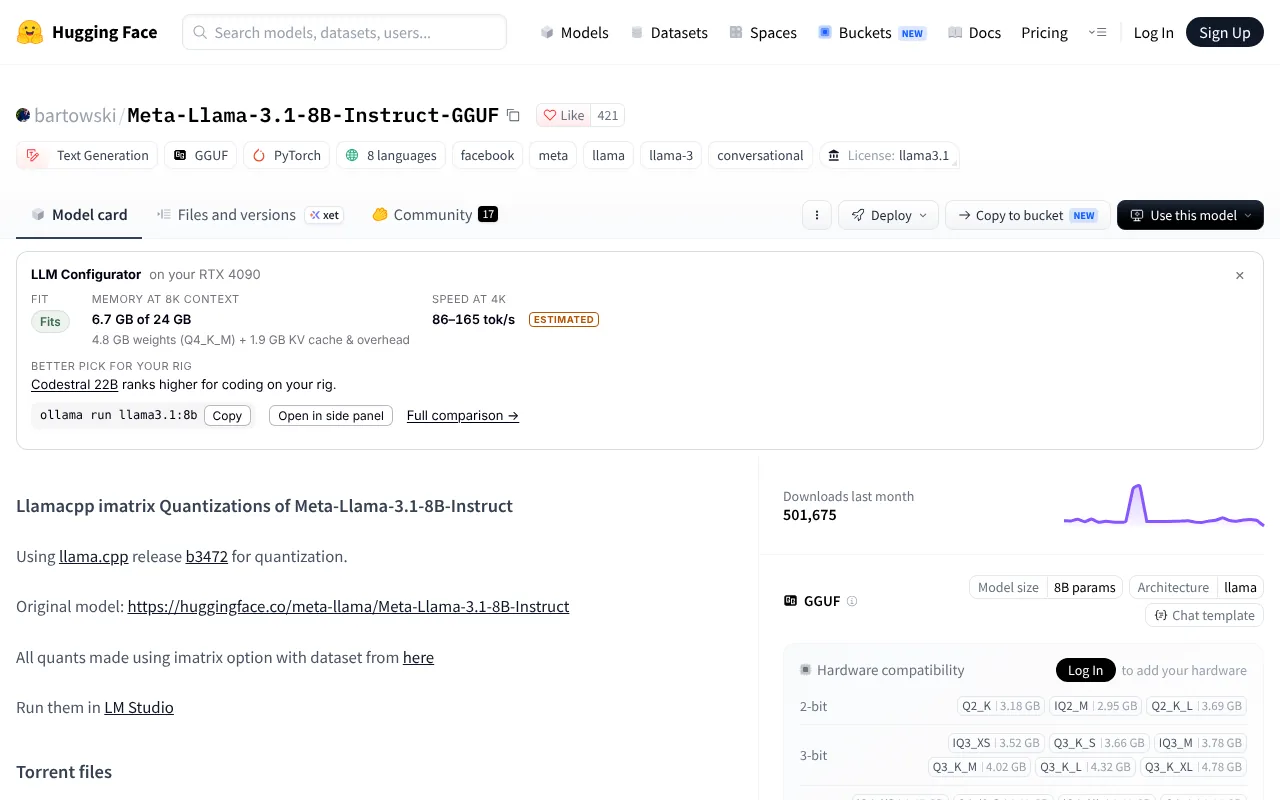
What it adds to a model page
Tokens per second on your rig, shown as a range and labelled estimated, measured or community. Hugging Face's own hardware panel compares file size with memory; it does not estimate speed.
Weights plus KV cache and overhead at 8K context, the figure our can-i-run pages state, or at any context you pick in the panel. Mixture-of-Experts models are sized from all of their parameters, because every expert has to be in memory.
If a model does not fit, or another ranks higher for what you use it for, the card names one alternative and says why, from the same ranking as our Best models page.
A copyable ollama run command, only where we have checked that the Ollama tag is this model, and only when it fits. It says which build the tag downloads.
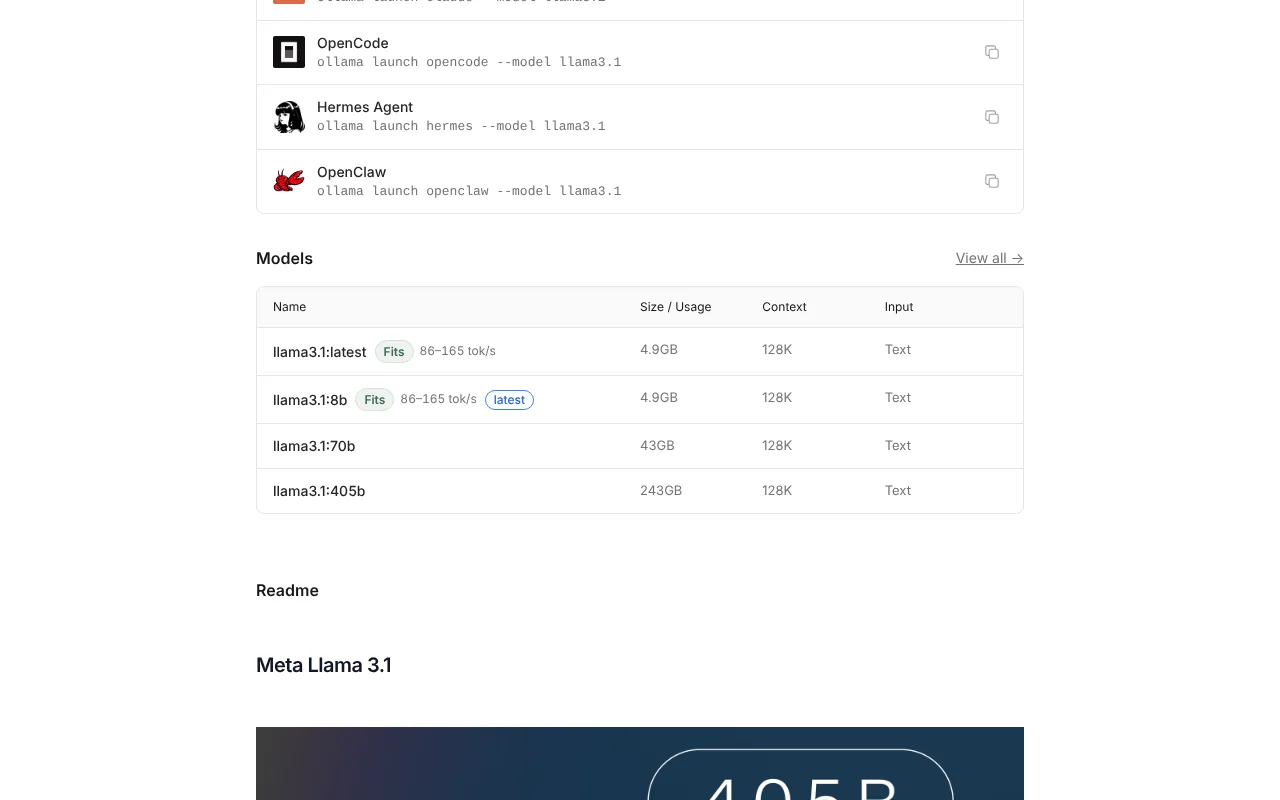
ollama.com has no fit check. The extension adds a chip to each tag we can size: Fits, Tight fit, Spills to system RAM or Too big, with a speed range.
A repo or tag that is not in our database gets nothing on the page and "Not in our database yet" in the panel. The extension never guesses a size or a speed.
How it works
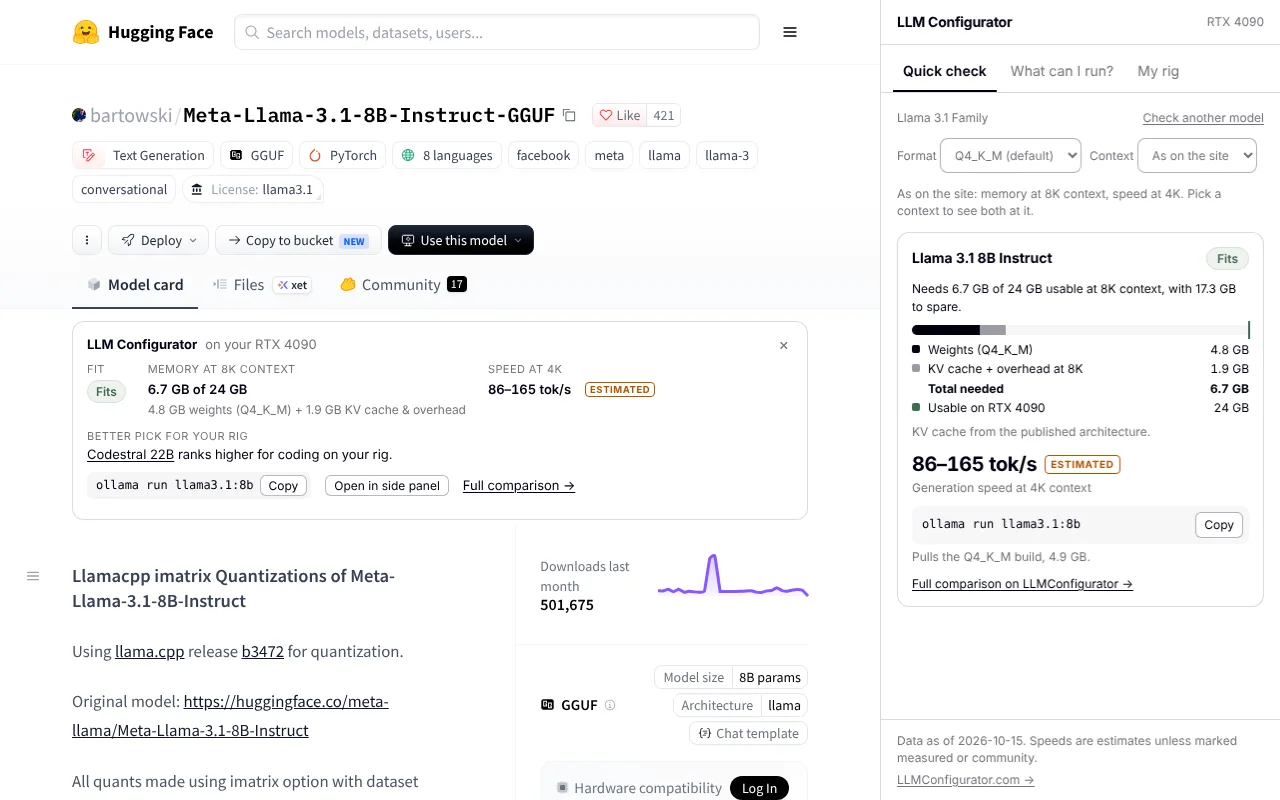
Set your rig once. Every figure is computed in your browser by the same engine as this site's can-i-run pages, so the extension and the site always agree.
- Install the extension and open its side panel from the toolbar.
- Pick your graphics card, Mac chip and memory, or a computer with no graphics card. Add what you mostly use AI for, if you like.
- Browse Hugging Face and Ollama as usual. Mapped models show a card or chips; click one to open it in the panel, or search any model there.
Private by default
- No account, no sign-in, no analytics, no cookies.
- The extension makes no network requests. Model and hardware data ship inside it and are updated with each release.
- Your rig is saved in your browser's extension storage and never leaves your computer.
- It reads only huggingface.co and ollama.com pages, to work out which model you are looking at.
Read the extension privacy policy, or how every number is calculated on the methodology page.
Questions
Is the extension free?
Yes. There is no paid tier, no account and no sign-in.
Does it send my hardware or browsing anywhere?
No. It makes no network requests at all: the model and hardware data are bundled with it, and your rig is stored in your browser. The only time anything loads from the internet is when you click a link to this site, which opens it in a normal tab.
How is this different from Hugging Face's hardware compatibility panel?
Hugging Face compares each file's size with the memory you have saved. The extension adds what that panel does not: the memory needed at your context length (KV cache included), an estimated speed on your machine, a better pick for your rig and a verified Ollama command. It also works on ollama.com, which has no fit check.
How accurate are the speeds?
Speeds come from the same model as the rest of this site: memory bandwidth, the parameters read per token, and efficiency figures fitted to real benchmark runs. They are shown as a range and labelled ESTIMATED; where readers have submitted benchmarks for your exact card and model, the label says MEASURED or COMMUNITY. The methodology page publishes the formulas.
Why does a model show nothing?
The card appears only when the repo is one of the models in our database: the repo itself, or a re-upload that declares one of them as the model it quantized and has the same parameter count. Fine-tunes, merges, embedding models and image models are left alone rather than given a guessed figure. You can still search any model we carry in the side panel.
Which browsers does it support?
Chrome and Edge, and Firefox from the same code. On Firefox the panel opens as a sidebar, and Firefox may ask you to allow access to huggingface.co and ollama.com before the cards and chips appear.
Can it detect my GPU automatically?
No, by design. Detecting hardware from a web page is unreliable and would need more permissions. You pick your graphics card or Mac once; it takes a few seconds.
When will it be available?
Soon. The extension is built and tested and is being prepared for the Chrome Web Store, Microsoft Edge Add-ons and Firefox Add-ons. The install buttons on this page will link to each listing as soon as it is live.
Get the extension
Until then, the same checks run on this site: check your hardware, browse the model library or let the Model Finder pick for you. Page updated 2026-10-17.